


Torque Pro (OBD 2 & Car)
4.010.60K Reviews
App Specs
- Version
- 1.12.108
- Updated On
- License
- $4.95
- Downloads
- 1,000,000+
- Developer
- Ian Hawkins
- Categories
- Communication
- Platform
- Android
Screenshots
 Analysis by AppCompare
I find a car diagnostic app most useful when it helps me ask better questions, not when it tempts me to treat a screen as a substitute for a mechanic. That’s the lens I’d use for Torque Pro (OBD 2 & Car): it turns a compatible phone and OBD2 adapter into a way to inspect vehicle information, check trouble codes and keep an eye on selected readings. In a household where one car is shared, that can make everyday handoffs and warning lights easier to discuss, as long as everyone understands what the readings can—and cannot—tell them.
A shared car benefits from a shared picture
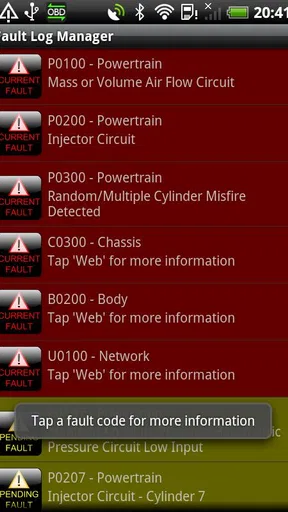
Imagine that one person drives to work in the morning and another takes the same car later for errands. A warning light appears between trips. Instead of passing along only “something looks wrong,” the driver can use the app to read a diagnostic code and share the result with the person who handles maintenance. That does not diagnose every fault or establish how urgent it is, but it gives the household a more specific starting point for deciding what to check next.
This is where I see a practical difference from a basic dashboard display. The car’s own instruments are better for essential alerts while driving; this app is more useful when you are parked and want to inspect engine information or make sense of a warning. I would not ask a passenger to interpret readings while the driver is moving, and I would never encourage anyone to operate the phone behind the wheel. Set up the display before a trip, then leave it alone until it is safe to stop.
Set up the connection before you need it
The app depends on an OBD2 adapter, so the first decision is not just whether to install it, but whether you have a compatible adapter and a vehicle it can communicate with. The connection process described for the app uses Bluetooth. I’d pair and test everything while the car is parked rather than waiting for a warning light in a busy car park. That simple dry run can reveal whether the adapter, phone and vehicle work together before anyone is relying on them.
It also helps to agree on a small number of dashboard readings instead of filling every available space with dials. One driver may care about fuel economy, while another wants engine information. A tidy screen is easier to understand at a glance and less likely to turn a useful tool into a distraction. If several people use the same phone, keep in mind that a dashboard tailored by one person may not suit the next; a quick check before setting off is a sensible habit.
The app is a paid download at $4.95, and Ian Hawkins is the developer. I’d weigh that cost alongside the separate need for an adapter, rather than assuming the app alone gives a phone access to the car. The audience rating is 4.0 from around 81,000 ratings, with roughly 11,000 written reviews and over 1 million installs. Those figures suggest an established audience, but they do not guarantee that a particular adapter or vehicle will work exactly as expected.
What a code can—and cannot—settle
Reading a trouble code is helpful because it gives you something concrete to investigate. Clearing one is more delicate. Turning off a warning light does not repair the underlying issue, and the light may return if the fault remains. In a shared household, I would tell everyone who drives the car before clearing a code, record or communicate what appeared, and make sure the person arranging repairs knows what happened. That avoids a common misunderstanding: a quiet dashboard is not proof that the car is fixed.
Worth Reading Before You Choose

EA SPORTS FC Mobile 26 Is a Bigger Football Game, but It Takes Time

Flipboard Shows What News Apps Must Do Beyond the Feed

Switching to Android Auto Means Rethinking Your Driving Routine

Google Calendar Makes a Crowded Week Easier to Manage

Ludo King Makes the Most of the Minutes Between Plans

Baby Panda World Brings Quick Play to Modern Phones, but Its Game Library Feels Busy
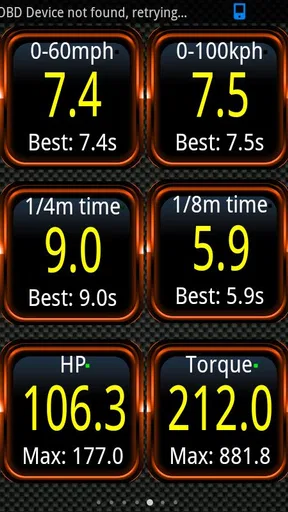
Performance readings are interesting too, particularly if you enjoy learning how a car behaves. Horsepower, torque and acceleration figures can help with informal comparisons or personal curiosity, but I would treat them as estimates and context rather than as a certified test. A run to check acceleration belongs in a safe, legal setting—not in traffic or on a public road where other people could be put at risk. For routine family travel, engine alerts and sensible driving habits matter much more than chasing a number.
Age context matters here. The app’s content rating is Everyone, but that does not mean every use is suitable for every child. Vehicle diagnostics and speed readings need adult judgment, and nobody should be encouraged to watch a phone while driving. If a younger household member is curious, I’d show them the parked-car dashboard and explain that an OBD reading is information to discuss, not a game or a reason to experiment on the road. There is no need to invent a family-control feature to make that boundary clear; it is a matter of how the device is used.
Who will get the most from it
I think it suits drivers who like to understand what their vehicle is reporting, people who want a more informed conversation with a repair shop, and enthusiasts who enjoy seeing performance data. It can also be useful for a household’s designated car-maintenance person, especially when drivers coordinate about a warning light or a change in how the car feels.
I’d skip it if you want a fully automatic maintenance service, a guaranteed diagnosis, or a tool that works without buying and connecting an adapter. It is also a poor fit for anyone who expects a phone app to replace a mechanic’s inspection. For a quick, occasional code check, a standalone scanner may be simpler; for a driver who wants configurable readings and ongoing access to vehicle data, an OBD app can be more flexible. The right choice depends on whether you will use those extra views enough to justify setup and learning them.
There is a learning curve behind the apparent simplicity. A dial is only useful if you know what it represents and whether it applies to your vehicle. I would start with a few familiar readings, compare them under ordinary conditions, and avoid drawing a conclusion from one unusual value. Vehicle equipment and the information exposed by it can vary, so a missing or unexpected reading is not automatically evidence of a fault. If a warning concerns safety or the car behaves abnormally, get qualified help rather than trying to settle the matter through the app alone.
Getting Started with Torque Pro
The first thing you need to know is that Torque Pro requires an OBD2 adapter to connect your smartphone to your car's ECU. Don’t worry; these adapters are pretty affordable and can be easily found online. Once you have that, setting up the app is a piece of cake. You just plug in the adapter, connect via Bluetooth, and voila! You’re ready to dive into the treasure trove of data.
User Interface and Experience
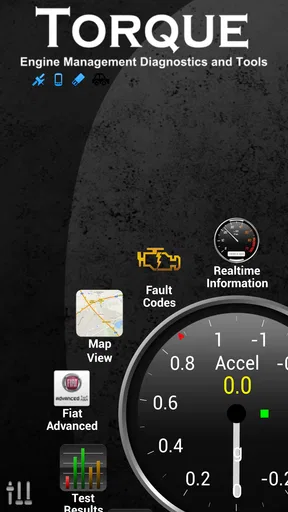
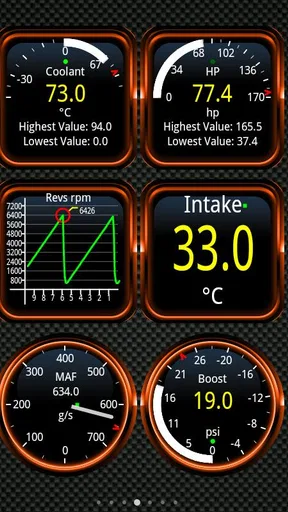
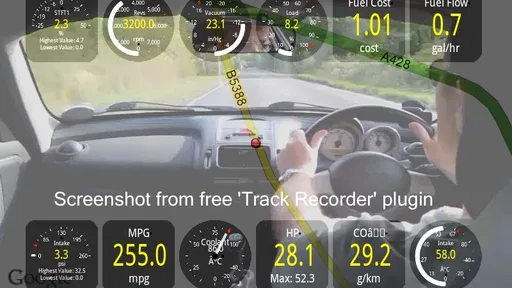
Let’s talk about the user interface. The app's layout is intuitive and straightforward, which is a relief given the plethora of information it provides. It’s designed to keep things simple while offering a wealth of data. You can customize the dashboard to show the metrics that matter most to you, from real-time engine performance to fuel economy. It’s like a control center for your car, and who doesn’t want to feel like they’re piloting their own spaceship?
One thing that stands out is how responsive the app is. The real-time data updates are quick, and there’s little to no lag, making it perfect for monitoring your car as you drive. The graphics are clear and easy to read, even at a glance, which is super important when you’re on the road.
Features that Rev Your Engine
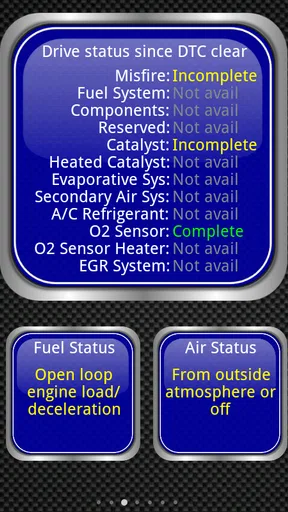
Now, let’s get into the nitty-gritty of what Torque Pro offers. One of its standout features is the ability to read and clear diagnostic trouble codes. So, next time your check engine light comes on, you won’t have to make an emergency trip to the mechanic. You can quickly see what’s wrong and even turn off the light if it’s a minor issue.
Another cool feature is the app's ability to monitor your car’s performance metrics. Want to know your car’s horsepower or torque? No problem. Interested in the 0-60 mph time? Torque Pro has got you covered. It’s like having a performance lab right in your palm.
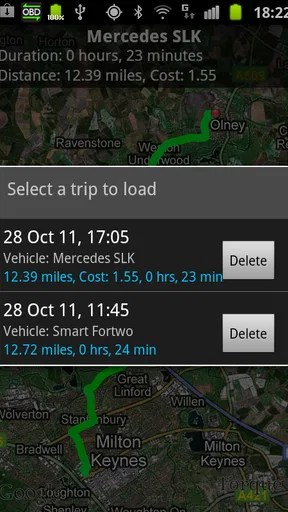
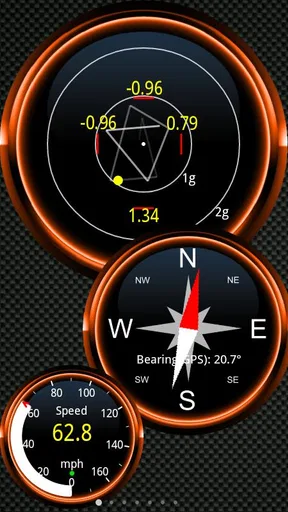
The app also lets you track your driving habits. You can see how fuel-efficient you are, which can be a real eye-opener. Plus, it offers GPS speedometer functions, so you know exactly how fast you’re going, which can be handy if your car's speedometer is a bit off.
Customization and Plugins
One of the things I love about Torque Pro is its customization options. You can tweak the dashboard to your liking, add different dials, and even change themes. It’s all about making the app work for you. And if you’re into even more advanced features, there are plugins available that can extend the app’s capabilities.
For those who love to tinker, the app supports various plugins that can further enhance your experience. Whether you want more detailed maps, weather tracking, or even social sharing options, there’s something for everyone.
Compatibility and Performance
The app is compatible with a wide range of vehicles, especially those manufactured after 1996 when OBD2 became standard. It performs well across different devices, whether you're using Android or iOS. Just make sure your adapter is compatible, and you’re good to go.
Performance-wise, the app is stable and doesn’t crash, which is crucial when you’re relying on it for real-time data. The developers have done a great job keeping it up to date, ensuring it runs smoothly on the latest smartphone models.
What to check before committing
Before buying an adapter or planning a household setup, I would confirm that the vehicle’s OBD2 system and the adapter can communicate with the app. OBD2 being common does not mean every vehicle exposes identical information, and an app cannot display readings that the car does not provide. This is especially worth remembering if your main reason for installing it is a particular performance value rather than basic diagnostic information.
The release date is Mar 7, 2010, and the current version is 1.12.108. It supports a minimum OS of 4.1. I’d check that the phone you plan to use meets that requirement and that its Bluetooth connection works reliably with the adapter. If you are purchasing the app for a shared vehicle, decide which phone will normally connect and who will keep track of any codes or observations; that small bit of coordination is more useful than expecting every driver to configure the same display from scratch.
One less obvious use is to establish a calm baseline. Rather than opening the app only when something seems wrong, a driver can learn what a few normal readings look like during ordinary parked checks or familiar trips. That makes an unusual change easier to notice, but it still does not turn a trend into a diagnosis. Write down the circumstances around a concerning reading—such as when it appeared and whether a warning light was on—so a repair professional has more context than a number on a screen.
Is Torque Pro Worth It?
So, is Torque Pro (OBD 2 & Car) worth your time and money? Absolutely. For anyone who wants to keep their car in top shape, it’s a fantastic tool. It’s informative, customizable, and gives you a level of insight into your vehicle that’s hard to get elsewhere. Plus, it’s just plain fun to use. Who knew diagnosing car issues could be so engaging?
Whether you’re a gearhead or just someone who wants to be more informed about their vehicle, Torque Pro is a solid investment. It’s like having a personal mechanic with you at all times, and honestly, who wouldn’t want that peace of mind?
My household verdict
For a shared car, I see the strongest case when one person is willing to learn the readings and pass along useful information clearly. The app can make a check-engine conversation less vague and let an interested driver explore engine data, but it cannot make every family member an equal expert or guarantee that a fault is minor. Agree on who checks codes, who arranges professional advice, and when the phone stays out of reach. That keeps the tool useful without letting it become a distraction or a false source of reassurance.
My recommendation is for curious owners who are comfortable pairing an adapter, narrowing the dashboard to a few meaningful readings and treating diagnostic results as clues. If you mainly want a no-setup explanation of a warning light, or if nobody in the household wants to interpret vehicle data, a simpler route to a mechanic or a basic scanner may suit you better. Used with realistic expectations, this is a hands-on way to know more about a car you share—not a replacement for careful driving, clear communication or proper repair.
Pros
- Comprehensive real-time data display.
- Customizable dashboard for user preferences.
- Supports a wide range of vehicles.
- Offers diagnostic trouble code reading.
- Easy integration with GPS features.
Cons
- Requires a separate OBD2 adapter.
- Can be overwhelming for beginners.
- Interface feels slightly outdated.
- Limited support for electric vehicles.
- Some features require additional setup.
FAQs for Torque Pro (OBD 2 & Car)
What is Torque Pro (OBD 2 & Car) used for?
Torque Pro is an advanced diagnostic tool for vehicles, allowing users to monitor their car's performance via an OBD2 adapter. It provides real-time data on engine performance, fuel efficiency, and fault codes. Ideal for car enthusiasts and mechanics, it helps in diagnosing issues and improving vehicle maintenance.
Which vehicles are compatible with Torque Pro?
Torque Pro is compatible with most vehicles manufactured after 1996 that support the OBD2 standard. This includes cars, trucks, and SUVs from various manufacturers. However, it's always best to check your vehicle's manual or consult the manufacturer to ensure compatibility before purchasing an OBD2 adapter.
Do I need any additional hardware to use Torque Pro?
Yes, to use Torque Pro, you need an OBD2 Bluetooth adapter. This device plugs into your car’s OBD2 port and communicates with the Torque Pro app on your smartphone or tablet. Make sure the adapter you purchase is compatible with your device’s operating system (Android or iOS).
Is Torque Pro available for both Android and iOS devices?
Torque Pro is primarily available for Android devices. While there are alternatives for iOS, the full-featured version of Torque Pro is designed for Android. iOS users may need to explore other apps or check for compatibility options if they wish to use this type of diagnostic tool.
How user-friendly is Torque Pro for beginners?
Torque Pro offers a user-friendly interface with customizable dashboards, making it accessible for beginners. However, understanding some of the technical data may require a bit of research. The app includes helpful guides and support for interpreting data, so even those new to car diagnostics can learn and benefit from its features.


